 Math notebook
Proofline
Solve, graph, test and visualise in one notebook — with data, findings and a report.
Proofline is a math notebook that runs in your browser. Each cell is a real calculator — symbolic workbench, equation solver with steps, graphing, exact matrices, number theory, statistics tests, graph algorithms, Big-O crossovers, floating point, erasure coding and more — and cells can read the same datasets, so one table flows through several analyses. Batch runs, A/B variants, run history, pinned findings and a printable report turn the results into conclusions you can share.
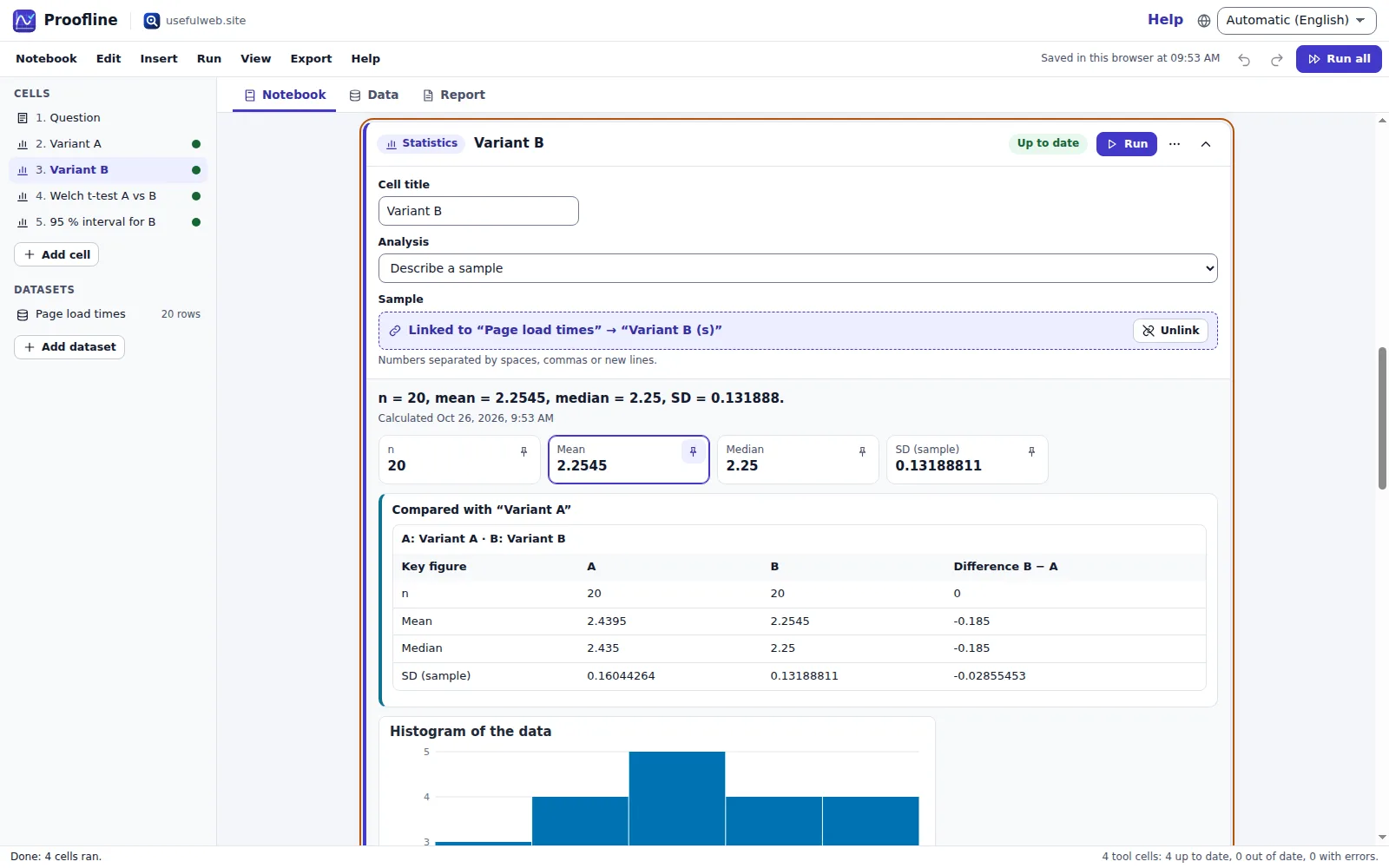
Screenshots
- Notebook with linked datasets and live results
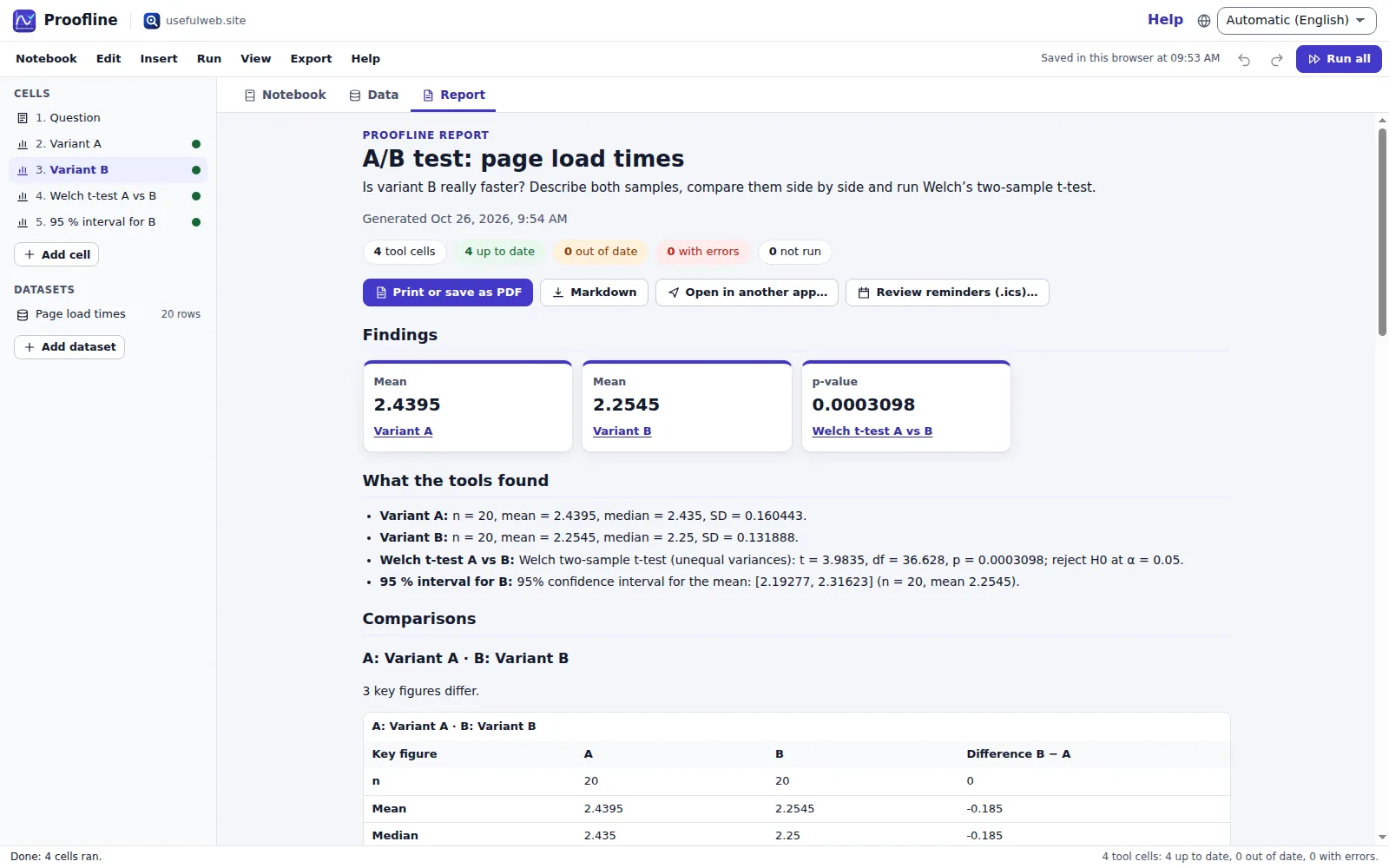 Findings dashboard and consolidated report
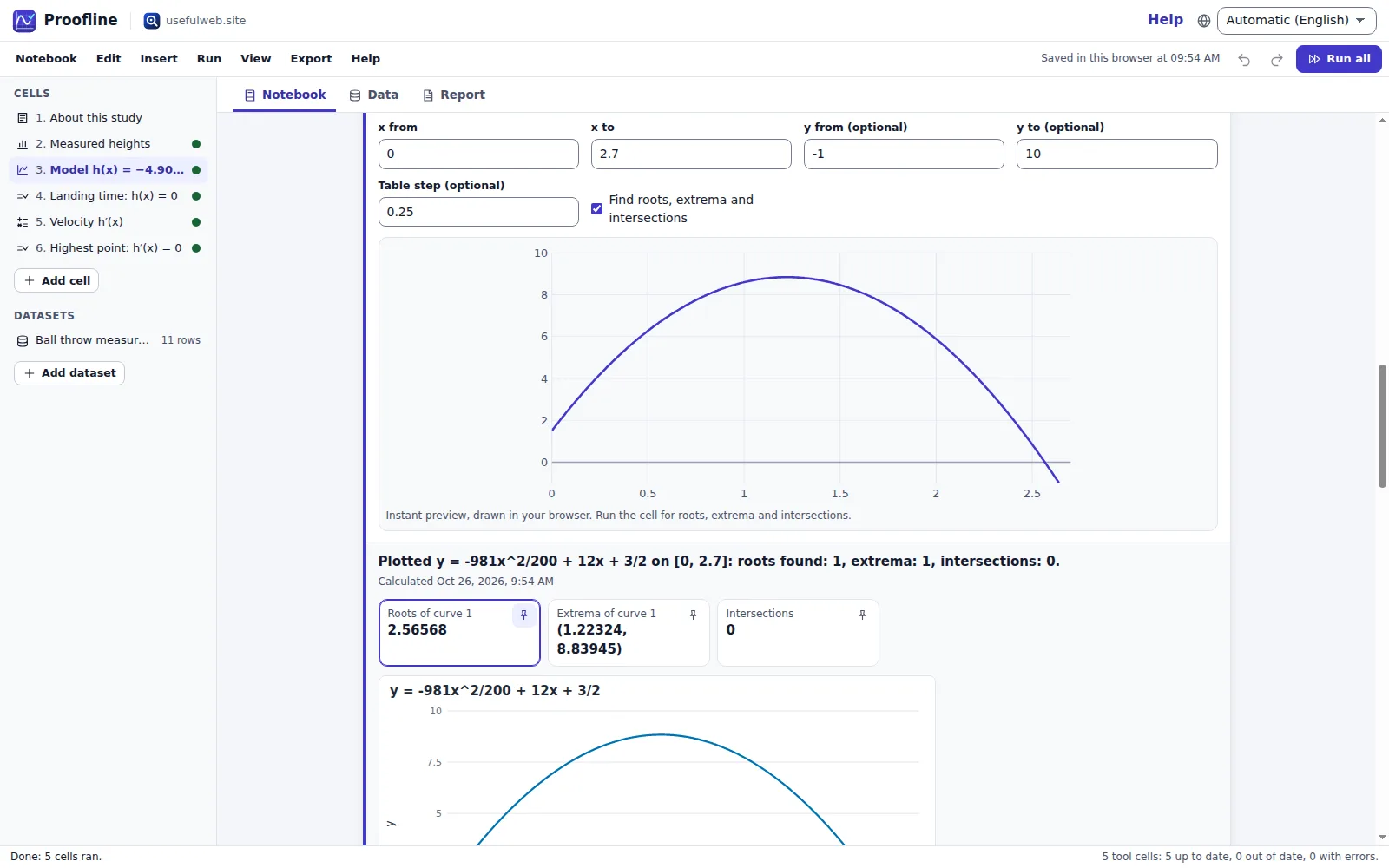 Instant preview and full graph analysis
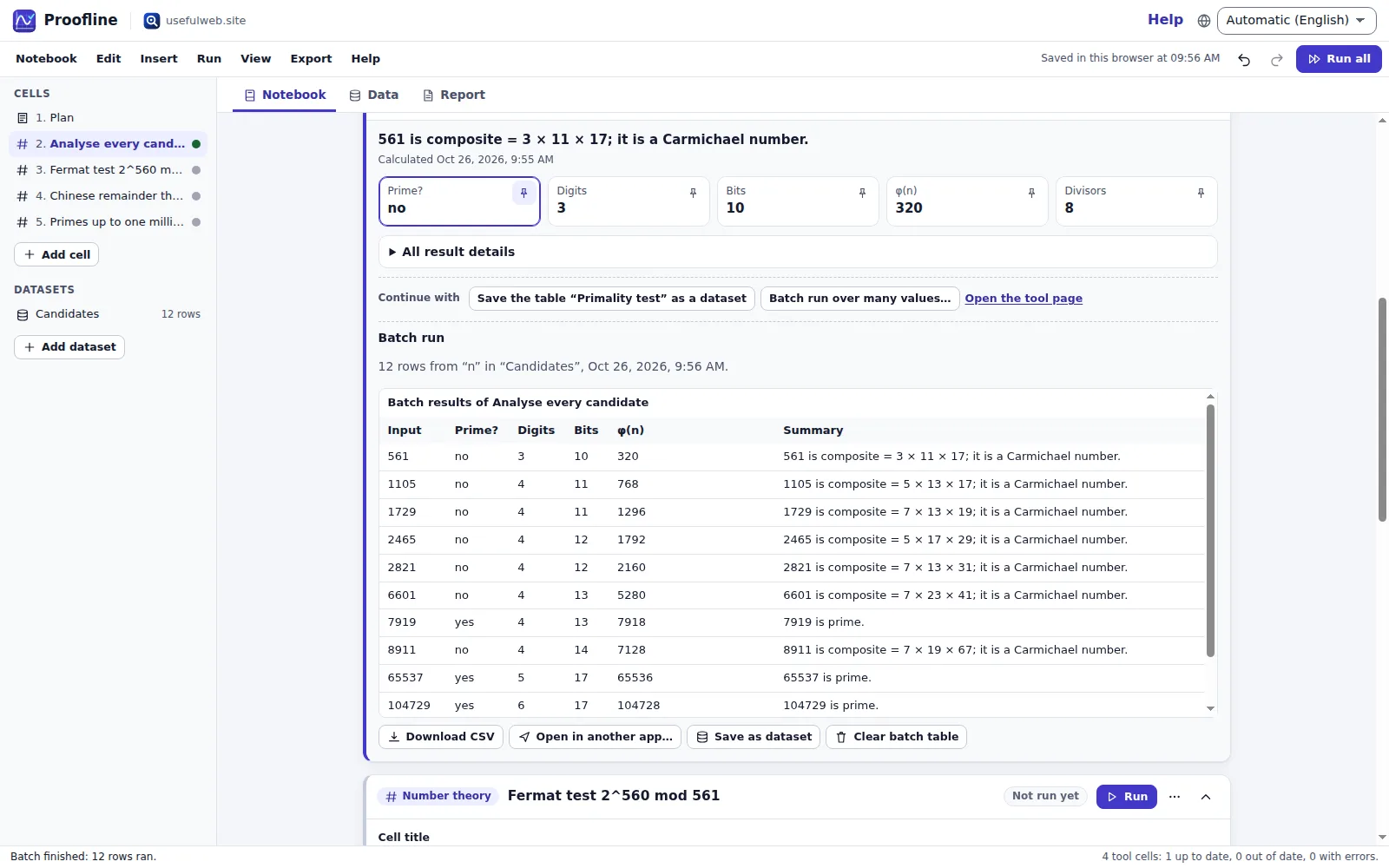 Batch run over a column
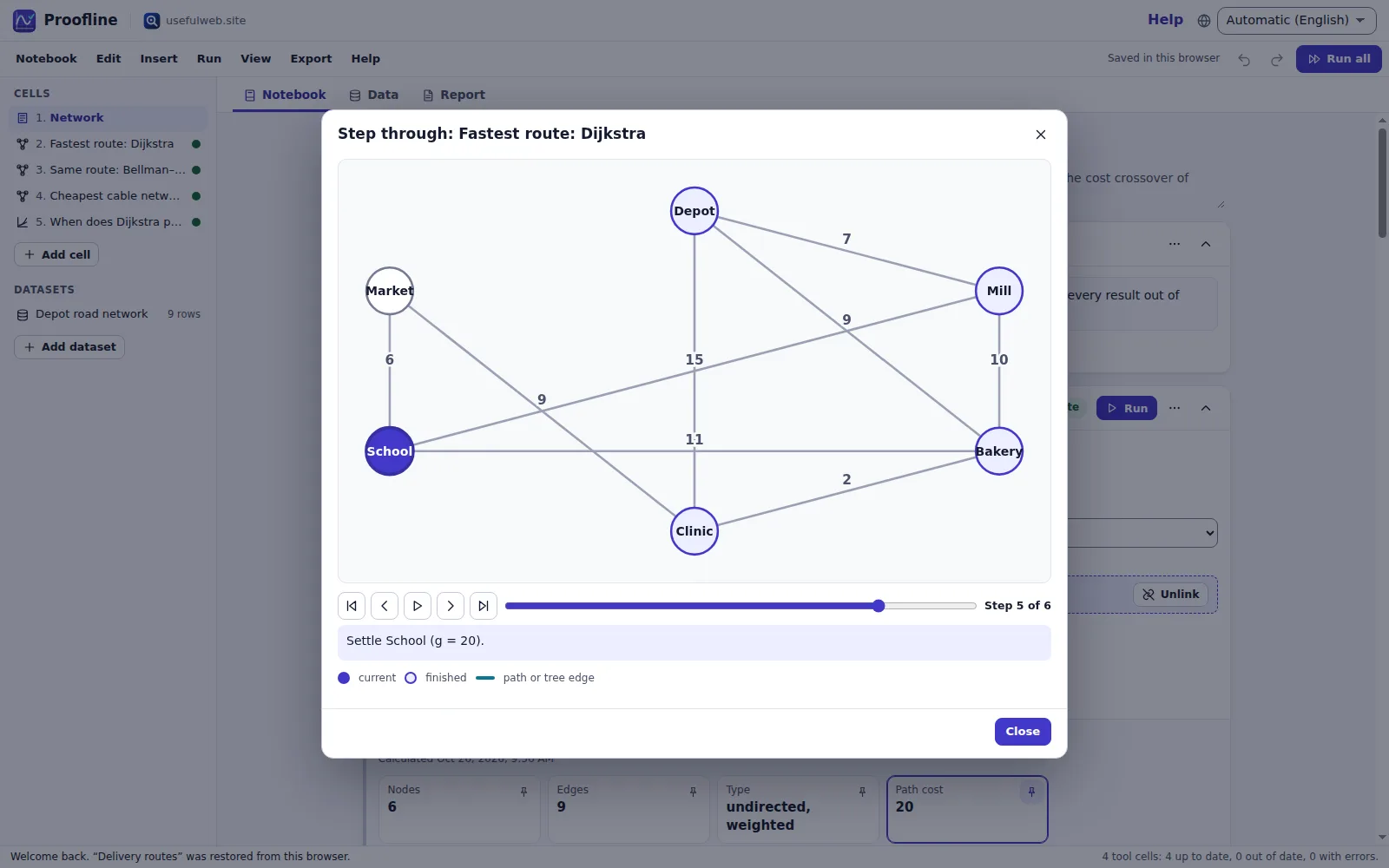 Step through graph algorithms
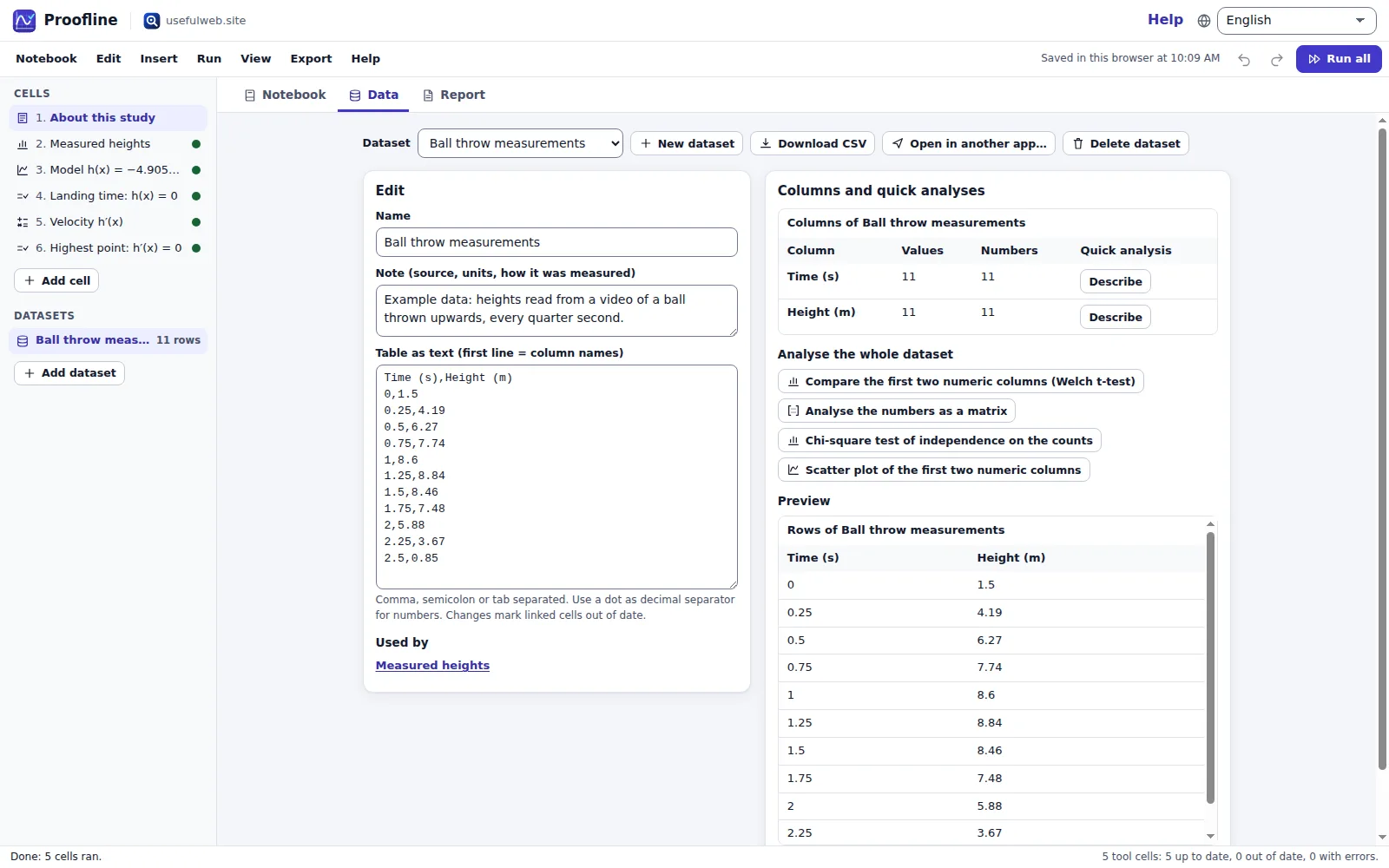 Datasets with quick analyses
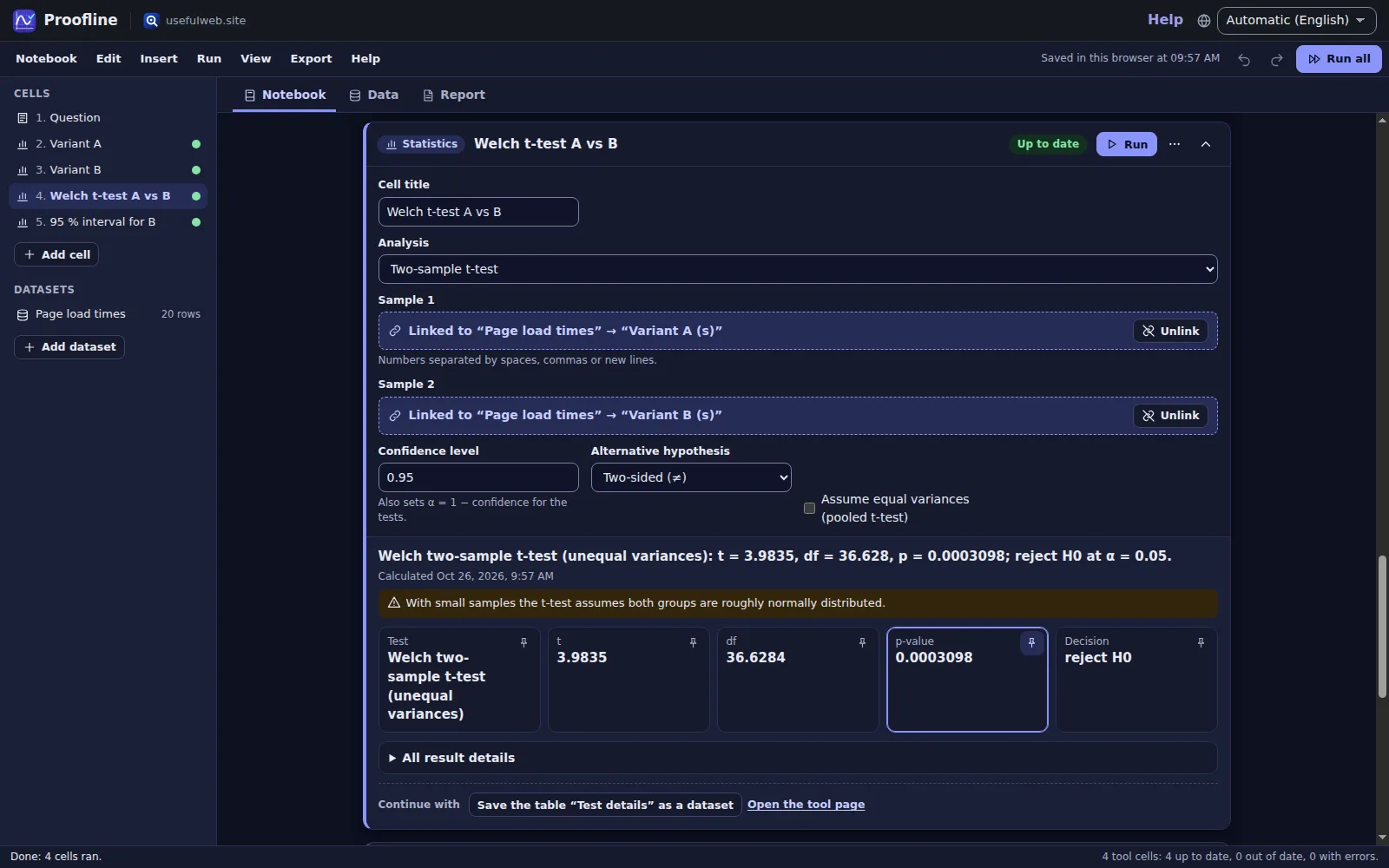 Dark theme
Features
Notebook of live cells
Thirteen calculators as cells plus Markdown notes: add, reorder, duplicate, collapse and run them one by one or all at once.
Shared datasets
Paste or import a CSV once and link columns to any cell — statistics, matrices and edge lists read the same data, and editing it marks every dependent result out of date.
Chained workflows
“Continue with” turns a result into the next step: plot a solved equation, graph a derivative, fit a normal distribution to a sample, reuse a matrix result or compare another algorithm.
Run all with progress
Run every cell or only the out-of-date ones in order, with progress, a Stop button, retries after rate limits and plain-language errors — typing is never blocked.
Batch runs over rows
Run one cell for every row of a column or a pasted list — primality of 100 numbers, a list of equations, tricky float values — and get one results table to export.
Scenario A/B
Make a variant of any cell, change one input and compare every key figure side by side with the difference B − A.
Run history over time
Each run is remembered with its inputs and key figures: see how a value changed, chart it across runs and restore earlier inputs.
Findings dashboard
Pin the figures that matter — a p-value, a determinant, a path cost — and see them with their trend on one dashboard.
Consolidated report
One report with findings, comparisons, every result summary, figures and batch tables: print it to PDF or export it as Markdown.
Instant function preview
Graph cells draw a local preview while you type; the full analysis with roots, extrema and intersections comes from the graphing tool.
Algorithm step player
Step through BFS, DFS, Dijkstra, Bellman–Ford, A*, Prim, Kruskal and more on your own graph, one settled node at a time.
Exports
CSV of datasets and batch tables, SVG and PNG figures, the notebook as JSON, a Markdown report and print-ready PDF.
Review reminders
Export spaced-repetition reminders (.ics) to revisit a notebook after 1, 3, 7, 14 and 30 days in any calendar app.
App Bridge
Send figures, tables and the report to other premium apps, or open a table or text from them as a dataset, note or equation cell.
Local-first notebooks
Autosave and recent notebooks in your browser, notebook files, share links, undo/redo and Google Drive when you are signed in.
Same tools for scripts and AI
Every cell is a documented usefulweb.site tool with a JSON API and MCP, and the notebook format has a published JSON schema.


Templates
Start from a ready-made project and change it to fit.
Projectile height study
Fit-check a throw: compare measured heights with the textbook model, then find the landing time and the highest point.
A/B test: page load times
Is variant B really faster? Describe both samples, compare them side by side and run Welch’s two-sample t-test.
Linear system three ways
Solve one 3×3 system by elimination, as a matrix equation and through the properties of its coefficient matrix.
Primes and Carmichael numbers
Which numbers fool the Fermat test? Analyse a list of candidates in one batch, then check a Fermat witness and solve a congruence system.
Delivery routes
Shortest routes from the depot with Dijkstra and Bellman–Ford, a minimum spanning tree for a cable network and the cost crossover of both algorithms.
Floating-point pitfalls
Why 0.1 + 0.2 ≠ 0.3: inspect the bits, compare double with single precision and batch-check a list of tricky values.
Patterns and puzzles
Math art, regex golf, keyboard statistics and Reed–Solomon erasure coding — the playful side of the notebook.
Built-in tools
Proofline uses these tools. Each one also has its own page and works on its own, in the browser, through the JSON API and through MCP.
- Math WorkbenchSimplify, factor, differentiate, integrate, solve, take limits, series and plots in one box.
- Step-by-Step Equation SolverSolve linear, quadratic, rational and radical equations or linear systems with every step shown.
- Graphing CalculatorPlot up to 6 functions or parametric curves with roots, extrema, intersections and SVG/PNG export.
- Matrix & Linear Algebra LabExact-fraction RREF with steps, determinant, inverse, null space, eigenvalues, LU/QR and Ax = b.
- Number-Theory LabPrimality, factorisation, gcd, modular arithmetic, CRT, φ, π(n), Collatz, continued fractions.
- Probability & Statistics StudioDistributions, descriptive stats, confidence intervals and t, chi-square and z tests with p-values.
- Graph Algorithm VisualizerBFS, DFS, Dijkstra, Bellman–Ford, A*, MST, topological sort and SCCs on your edge list.
- Big-O Crossover CalculatorWhen does c₁·n log n beat c₂·n²? Crossover points, log-log chart and run times.
- Erasure-Coding PlaygroundReed–Solomon over GF(256): encode data into k + m shards, lose some, rebuild it.
- Floating-Point ExplorerSee how IEEE-754 half/single/double store a number: bits, exact value, ULP, rounding error.
- Equation Art StudioTurn math into art: parametric, polar, Lissajous, rose and spirograph curves.
- Regex Golf ArenaMatch the left list, avoid the right list — in as few characters as possible.
- Keyboard Heatmap VisualizerPaste any text: see which keys and fingers do the work on QWERTY, Dvorak, Colemak & co.
For AI agents
Proofline runs on a deterministic engine. The same functions are available as tools with a JSON API and MCP, so scripts and AI agents get exactly the results the app shows.
- Math Workbench – Simplify, factor, differentiate, integrate, solve, take limits, series and plots in one box.
Tool page ·POST https://proofline.usefulweb.site/api/v1/tools/math-workbench/calculate· MCPmath_workbench - Step-by-Step Equation Solver – Solve linear, quadratic, rational and radical equations or linear systems with every step shown.
Tool page ·POST https://proofline.usefulweb.site/api/v1/tools/equation-solver-steps/calculate· MCPequation_solver_steps - Graphing Calculator – Plot up to 6 functions or parametric curves with roots, extrema, intersections and SVG/PNG export.
Tool page ·POST https://proofline.usefulweb.site/api/v1/tools/graphing-calculator/calculate· MCPgraphing_calculator - Matrix & Linear Algebra Lab – Exact-fraction RREF with steps, determinant, inverse, null space, eigenvalues, LU/QR and Ax = b.
Tool page ·POST https://proofline.usefulweb.site/api/v1/tools/matrix-linear-algebra-lab/calculate· MCPmatrix_linear_algebra_lab - Number-Theory Lab – Primality, factorisation, gcd, modular arithmetic, CRT, φ, π(n), Collatz, continued fractions.
Tool page ·POST https://proofline.usefulweb.site/api/v1/tools/number-theory-lab/calculate· MCPnumber_theory_lab - Probability & Statistics Studio – Distributions, descriptive stats, confidence intervals and t, chi-square and z tests with p-values.
Tool page ·POST https://proofline.usefulweb.site/api/v1/tools/probability-statistics-studio/calculate· MCPprobability_statistics_studio - Graph Algorithm Visualizer – BFS, DFS, Dijkstra, Bellman–Ford, A*, MST, topological sort and SCCs on your edge list.
Tool page ·POST https://proofline.usefulweb.site/api/v1/tools/graph-algorithm-visualizer/calculate· MCPgraph_algorithm_visualizer - Big-O Crossover Calculator – When does c₁·n log n beat c₂·n²? Crossover points, log-log chart and run times.
Tool page ·POST https://proofline.usefulweb.site/api/v1/tools/big-o-crossover-calculator/calculate· MCPbig_o_crossover_calculator - Erasure-Coding Playground – Reed–Solomon over GF(256): encode data into k + m shards, lose some, rebuild it.
Tool page ·POST https://proofline.usefulweb.site/api/v1/tools/erasure-coding-playground/calculate· MCPerasure_coding_playground - Floating-Point Explorer – See how IEEE-754 half/single/double store a number: bits, exact value, ULP, rounding error.
Tool page ·POST https://proofline.usefulweb.site/api/v1/tools/floating-point-explorer/calculate· MCPfloating_point_explorer - Equation Art Studio – Turn math into art: parametric, polar, Lissajous, rose and spirograph curves.
Tool page ·POST https://proofline.usefulweb.site/api/v1/tools/equation-art-studio/calculate· MCPequation_art_studio - Regex Golf Arena – Match the left list, avoid the right list — in as few characters as possible.
Tool page ·POST https://proofline.usefulweb.site/api/v1/tools/regex-golf-arena/calculate· MCPregex_golf_arena - Keyboard Heatmap Visualizer – Paste any text: see which keys and fingers do the work on QWERTY, Dvorak, Colemak & co.
Tool page ·POST https://proofline.usefulweb.site/api/v1/tools/keyboard-heatmap-visualizer/calculate· MCPkeyboard_heatmap_visualizer
- MCP endpoint (Streamable HTTP):
https://proofline.usefulweb.site/mcp - Project file format (JSON Schema): https://proofline.usefulweb.site/project.schema.json
- OpenAPI description: /openapi.json · llms.txt · API & MCP
Build a project through the API, then open it in the app with a link to https://proofline.usefulweb.site/app#project=<base64url JSON>.
Import & export
Import
- Proofline notebook (.proofline.json)
- CSV, TSV or semicolon tables (datasets)
- Pasted lists and tables
- Share link (#project=…)
- Tables and text from other premium apps (App Bridge)
Export
- Proofline notebook (.proofline.json)
- CSV of datasets, batch runs and result tables
- SVG and PNG figures
- Markdown report
- Printable report (PDF via print)
- Review reminders (.ics)
- Share link
Keyboard shortcuts
| Keys | Action |
|---|---|
| Ctrl + Enter | Run the current cell |
| Shift + Enter | Run the current cell and go to the next one |
| Ctrl + Shift + Enter | Run all cells |
| Ctrl + Z / Ctrl + Y | Undo / redo |
| Ctrl + S | Save notebook file |
| Ctrl + O | Open notebook file |
| Alt + ↑ / Alt + ↓ | Move the current cell up or down |
| Ctrl + Shift + D | Duplicate the current cell |
| J / K | Next / previous cell |
| 1 / 2 / 3 | Notebook, Data or Report view |
| N | Add a cell |
| ? | Keyboard shortcuts |
Frequently asked questions
Is Proofline free?
Yes. The notebook runs in your browser and saves to your browser’s storage and to files you download. There is no account; the calculations use the same free usefulweb.site tools as their own pages.
Where are the calculations done?
Each cell sends its inputs to the matching usefulweb.site tool on this site and shows the answer. The instant graph preview, datasets, notes, the step player, comparisons and the report work in your browser. Nothing is stored on the server.
Does it work offline?
Partly. Your notebooks, datasets, notes, earlier results, the report and the graph preview stay available offline; running a cell needs a connection because the tools run on the server. Proofline tells you when you are offline and you can run the cells again later.
What is a linked dataset?
A table in the Data view. A cell field such as a statistics sample, a matrix or an edge list can read a column (or the whole table) instead of typed text. When the data changes, linked cells are marked out of date until you run them again.
How do batch runs work?
For cells with one main input (a number, an equation, a value, a regex …) Batch run calls the tool once per row of a column or pasted list, at most 200 rows, paced to stay inside the rate limit. The results form one table you can export as CSV.
Can I trust the answers?
The tools use exact arithmetic where they say so (fractions, big integers), document their methods and verify solutions where possible, but they are teaching and checking aids. For exams, publications or safety-relevant work, verify important results independently.
Can an AI agent build a notebook?
Yes. The format is published at /project.schema.json; cell inputs use the exact field names of the tool API. An agent can call the 13 tools through the JSON API or MCP and hand the notebook over as a file or an /app#project=… link.
Limitations
What Proofline does not do (yet):
- Cells run on the server: running needs a connection and is rate limited (about 120 calculations per minute).
- There are no variables shared between cells; cells share data through datasets and “Continue with” actions.
- The instant graph preview understands common functions only; the graphing tool is the reference.
- Regex golf cells only test against the puzzle (dry run); leaderboard submissions stay on the tool page.
- Batch runs are limited to 200 rows per run and to cells with a single main input.
- Share links carry inputs, data and notes, not results; very large notebooks are better shared as files.
- On phones the notebook is fully usable, but long matrices and datasets are easier to edit on a larger screen.
Tutorials
Learn Proofline step by step.
- Your first notebook in 5 minutesAdd a cell, run a real calculator, read the result, pin a key figure and find it again in the report. No account, nothing to install.Beginner 5 min
- One dataset, many analysesPaste a table once, link its columns to statistics, matrix and graph cells, and let Proofline tell you which results are out of date when the data changes.Beginner 8 min
- Batch runs, A/B variants and run historyRun one cell over a whole column, compare two versions of a calculation side by side and see how a key figure changed over time.Intermediate 10 min
- Graphs, algorithm steps and chained workflowsUse the instant graph preview, chain results into the next cell with “Continue with”, and step through Dijkstra on your own road network.Intermediate 10 min
- Reports, sharing, exports and review remindersTurn a notebook into a printable report, share it as a link or file, hand tables and figures to other apps and schedule spaced-repetition reviews.Beginner 7 min
Ready to try it?
Other premium apps
-

Kerfwise
Cabinet & furniture CAD
Design cabinets and furniture, get cut lists, optimised sheet layouts, costs and drawings.
-

Kinetica
Robot motion studio
Simulate robot arms in your browser: kinematics, trajectories, collisions, program export.
-

Threadsmith
Embroidery digitizing studio
Draw or import artwork, turn it into stitches, export DST, PES, JEF or EXP files.
-

Ohmforge
Virtual electronics workbench
Draw a circuit, switch it on, and measure it with real-feeling bench instruments.
-

Twinworks
Factory digital twin & production simulation
Model a production line, simulate it and find the bottleneck — free, in your browser.
-

Agentlab
AI-agent & LLM workbench
Test an AI agent before release: permissions, traces, costs, citations and output checks.
-

Bundlekeep
Local project backup
Back up projects from every usefulweb app into one file, check it and restore any part.
-

Chainscope
Web3 investigation desk
Investigate transactions, bridges, contracts, DAOs and wallets in one case file.
-

Chartroom
Data & charts studio
Import data, chart it, run analyses and publish a report — one workspace, free.
-

Fieldday
Sports club & training organiser
Fixtures, brackets, ratings and training plans for your club — in one workspace.
-

Flipline
Drawing, storyboards & animation
A few drawings. A little life. Make a flipbook in your browser.
-

Hearth
Home & travel planner
Plan meals, chores, home care, a move and trips for your whole household in one place.
-

Keysmith
Crypto & secrets lab
Audit certificates, keys, TLS and passwords in one lab; secrets stay on your device.
-

Ledgerly
Household finance & life-admin desk
Budgets, bills, subscriptions, loans, contracts and deadlines on one private desk.
-

Lumina
Photo editor & image toolkit
Bring out what you saw. A free photo studio, right in your browser.
-

OBSCURIQ
OSINT case desk
Organize public-source research: cases, a research log, pivots and indicators.
-

Opsdeck
Developer & ops workbench
One deck for CI failures, cron, traces, k8s events, API diffs, query plans and Terraform.
-

Pageboard
Website inspiration boards
Collect website references, sort them with tags and arrange them on a moodboard.
-

Panelcraft
Comic books & figure references
Shape a page. Arrange a book. Give your story a voice.
-

Paperwell
Document studio: PDFs, OCR, redaction, forms & contract reading
Your paperwork in one dossier: PDF tools, OCR, redaction, forms and contract reading.
-

Provenance
Software supply-chain security desk
SBOMs, CVEs, containers and licences in one risk register — free, in your browser.
-

RavingDesk
Paper trading workspace
Practise trading on paper: orders, ledger, risk, exposure and journal. No real money.
-

Reelcraft
Audio, video & image batch studio
Audio, video & image batch studio: cut, convert, compress, subtitle, reframe
-

Renderloom
3D scene & material studio
Shape a scene. Find its light. Keep every idea editable.
-

Signalhouse
Website & internet infrastructure inspector
Inspect DNS, TLS, mail, CDN and routing of all your domains — and see what changed.
-

Tonegrid
Tone matrix & beat sequencer
Light up squares to build looping melodies and beats, then arrange them into songs.